



By @andreigirbea, Andrei Girbea
May 26, 2026
Asus ROG Zephyrus G16 detailed review (2026 GU606 – Intel Panther Lake, RTX 5080)
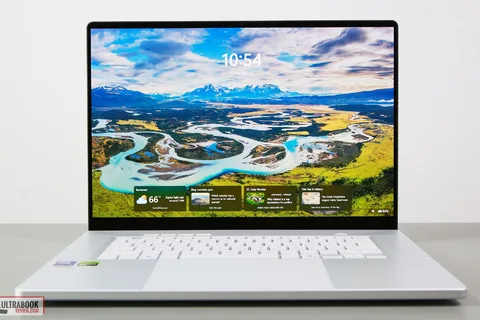
In this article, we’re discussing the 2026 generation of the Asus ROG Zephyrus G16, specifically its latest GU606 variant. The ROG Zephyrus G16 2026 is an updated version of the previous G16 models we’ve already tested and talked about. It’s still a premium, lightweight 16-inch laptop that delivers some of the best performance possible in this niche. This series is aimed at those looking at a sleek, high-end laptop with a stunning OLED screen and solid performance for pretty much anything — whether it’s work, creative stuff, or gaming. All packed into a compact, lightweight body, under 2 kilos. Of course, it comes with a premium price tag, especially today, given the realities of 2026. All in all, the Zephyrus G16 2026 is going head-to-head with the Apple MacBook Pro 16, and other solid Windows options like the Dell XPS 16, Asus ProArt P16, Razer Blade 16, and Lenovo Yoga Pro 9. Below, I’ve put together my honest, detailed thoughts on this year’s GU606 update — everything you should know before deciding if this notebook is right for you. ASUS ROG Zephyrus G16 GU606 – specs sheet ASUS ROG Zephyrus G16 GU605AW, 2026 generation Display 16-inch, 16:10, non-touch, lucios, anti-glare, OLED QHD+ 2560 x 1600 px , 240 Hz VRR 0.2ms , 500 nits SDR, 1100 nits peak HDR, 100% DCI-P3 colors Processor Intel Panther Lake H, Core Ultra Series 3, Core Ultra 9 386H, 4PC+8Ec+4LPEc/16T, max 4.9 GHz Video Intel + Nvidia RTX 5080 16GB (up to 160W with Dyn Boost) on this GU606AW version RTX 5060 to 5090 variant available with MUX, Advanced Optimus, and GSync Memory 64 GB LPDDR5-8533 (onboard), max 64 GB Storage 1 TB SSD (Sandisk) , 2x M2 2280 slots, gen4 Connectivity WiFi 7 2×2 with Bluetooth 5.4 (Intel B211) Ports left: DC-in, HDMI 2.1 FRL, 1x USB-C Thunderbolt 4.0 , 1x USB-A 3.2, audio jack right: 1x USB-A 3.2, 1x USB-C gen2 (with data, DP, PD), SD UHS-II card reader Battery 90 Wh, 250 W power adapter , USB-C charging up to 100W Size 354 mm or 13.96” (w) x 246 mm or 9.68 (d) x from 14.9 or .59” (h) Weight 1.95 kg (4.3 lbs) for this RTX 5080 version, from 1.85 kg for the 5060/5070 variants .72 kg (1.6 lbs) for the 250W main power brick and cables, EU version Extras clamshell format with 130-degree hinge, updates hinge mechanism, premium design and updated lightbar design on the lid, minimalist single-zone RGB keyboard and large glass touchpad, 6x speakers – 10W, FHD webcam with IR, two internal designs, upper variant with vapor-chamber cooling, available in silver (Platinum White) or gray (Eclipse Gray) variants Design and ergonomics The 2026 Zephyrus G16 (GU606) and 2025 (GU605) models share the same premium unibody chassis, which is still one of the best-looking and nicest-feeling designs in the high-end Windows laptop space. Aesthetically, Asus offers the Zephyrus G16 in two colors: a lighter gray (Platinum White) and a darker gray (Eclipse Gray). We have the lighter one here, but I personally prefer the darker version’s overall look and vibe. That one does show smudges easier, though, for what that’s worth. The build quality is excellent on this CNC unibody aluminum chassis, with a sturdy main deck and little flex in the lid cover. Furthermore, the metal surfaces have a coarser feel to them; they’re not as smooth as on MacBooks, and offer improved grip. The coating could, however, chip over time on the Eclipse Gray color, something to perhaps consider in your decision. Here are some photos of the Zephyrus G16 chassis in both color options. And here are some extra shots of the 2026 GU606 model in the light gray (Platinum White). Both versions feature the Slash Lighting LED bar on the lid. The 2026 model brings an updated version with more control zones — the same number of 35 LEDs, but now each one can be controlled individually, instead of just in groups. That said, I still wish they had ditched it entirely. The lid would look cleaner with a simpler design, like on the ProArt P16, which uses the same chassis but goes for a fully black minimalist look. You can turn the LEDs off, which leaves just the chrome diagonal line on the lid. Another small upgrade for 2026 is the improved hinges. They now adjust torque throughout the opening motion — softer when you first lift the screen, then progressively tighter to keep it stable at different angles. I didn’t really have issues with the old hinges, so nothing to comment on this matter. However, I do wish there were a notch of some sort on the front lip to make it easier to grab the screen. Furthermore, the maximum opening angle is still limited to about 130 degrees. These things haven’t changed. This is mostly because the overall chassis layout is the same as before, with the cooling system still placed entirely at the rear. The internal cooling module has been revised, though. More on this in a bit. Worth noting: Much like in the past, Asus actually offers two slightly different chassis versions for this series. There’s a thinner and lighter one (around 1.85 kg) for the RTX 5060/5070 models, and a slightly heavier one (about 1.95 kg) with a vapor chamber cooling system for the higher-end RTX 5070 Ti / 5080 / 5090 versions. Our configuration is the 5080. One result of the cooling design is how much space is left on the sides for ports. You’ll find everything you need on a modern laptop: USB-A and USB-C on both sides, HDMI, audio jack, and a fast SD card reader. There’s support for charging on both USB-C ports, so you can plug in a charger from either side. The charging port is still the newer square design that makes the cable annoyingly stick out to the side. Keyboard and touchpad The keyboard and touchpad on this 2026 model are identical to the ones on the 2025 version. That said, the Zephyrus series still delivers one of the best typing experiences in the premium all-rounder laptop segment. I’d even say it beats the MacBook and modern ThinkPads. The layout is clean and minimalistic — no NumPad or extra keys, just the media controls in the top-left corner that you get on all ROG laptops. Personally, I like this simplified approach, but some of you may find the lack of NumPad a deal breaker. As for the two color options, the Platinum model has a white keyboard, while the Eclipse version has a gray one that matches the chassis’s color. The darker gray keycaps offer better contrast with the RGB lighting, but it also shows fingerprints more easily. The RGB lighting is single-zone only, so not per-key, but the LEDs are bright and even. You won’t find fancy features like those on some competitors from Razer, MSI, or Lenovo (such as highlighting the function keys when you press FN or showing secondary functions on Shift). There are no complex lighting effects either. It’s a simpler approach where you can only change the base color. Not great, not terrible. The touchpad works well most of the time, but it’s just too big — it stretches from just a millimeter below the Space key all the way to a millimeter from the front edge of the chassis. For normal desk use, the size isn’t really a problem, especially since palm rejection works well. But when using the laptop on your lap, the lack of a clear separation between the touchpad and the front edge can lead to accidental touches from your clothes. It’s pretty annoying on a portable machine that isn’t always going to live on a desk — along with the limited screen opening angle, these aspects interfere with the on-lap use experience. On the biometrics side, you get an IR camera for face recognition, but there’s no fingerprint sensor in the power button. 16-inch OLED display The display on this Zephyrus G16 GU606 is one of the biggest positive upgrades compared to the previous models. We’re still getting a non-touch OLED that Asus calls a NEBULA HDR OLED, but a newer generation Samsung OLED panel that’s significantly brighter than before. It’s a regular OLED, not a Tandem OLED like you get on the ProArt P16. Compared to previous-gen OLEDs, this one delivers higher sustained and peak brightness — hitting 500 nits in SDR and up to 1100 nits in HDR peak. That makes the laptop more usable in bright rooms (despite still being a glossy finish) and noticeably improves HDR quality in supported videos and games. The image shows a window reflecting in the screen, while the content remains well visible, unlike on older OLEDs. At the same time, the Tandem OLEDs implemented on a few other notebooks are still brighter. Furthermore, since this is non-touch, the content looks clean and neat, and there’s no graininess on solid light backgrounds, like on the touch OLED implementations. At the same time, this OLED generation keeps the same 2.5K resolution, 240Hz refresh rate, 0.2ms response time, VRR, and G-Sync support, so it’s still excellent for gaming. Here are the technical specs of this OLED panel on the GU606 refresh: Panel HardwareID: Samsung ATNA60HU06-0; Coverage: 100% sRGB, 93.9% AdobeRGB, 99.9% DCI-P3,; Measured gamma: 2.18; Max SDR brightness in the middle of the screen: 506.41 cd/m2 on power; Min brightness in the middle of the screen:
Source: Ultrabookreview.com